BlogVale vs. EkLine: Why We Built a "Zero-Config" Alternative for Docs CI
Vale is the industry standard for prose linting, but it requires significant "configuration debt" (managing .ini files, style folders, and regex rules). EkLine offers a "Zero-Config" alternative that works out of the box. Unlike Vale, EkLine includes native broken link validation and uses smart filt
If you manage technical documentation, you know Vale. It is the industry standard for prose linting. It is powerful, open-source, and highly customizable.
But "customizable" is a double-edged sword.
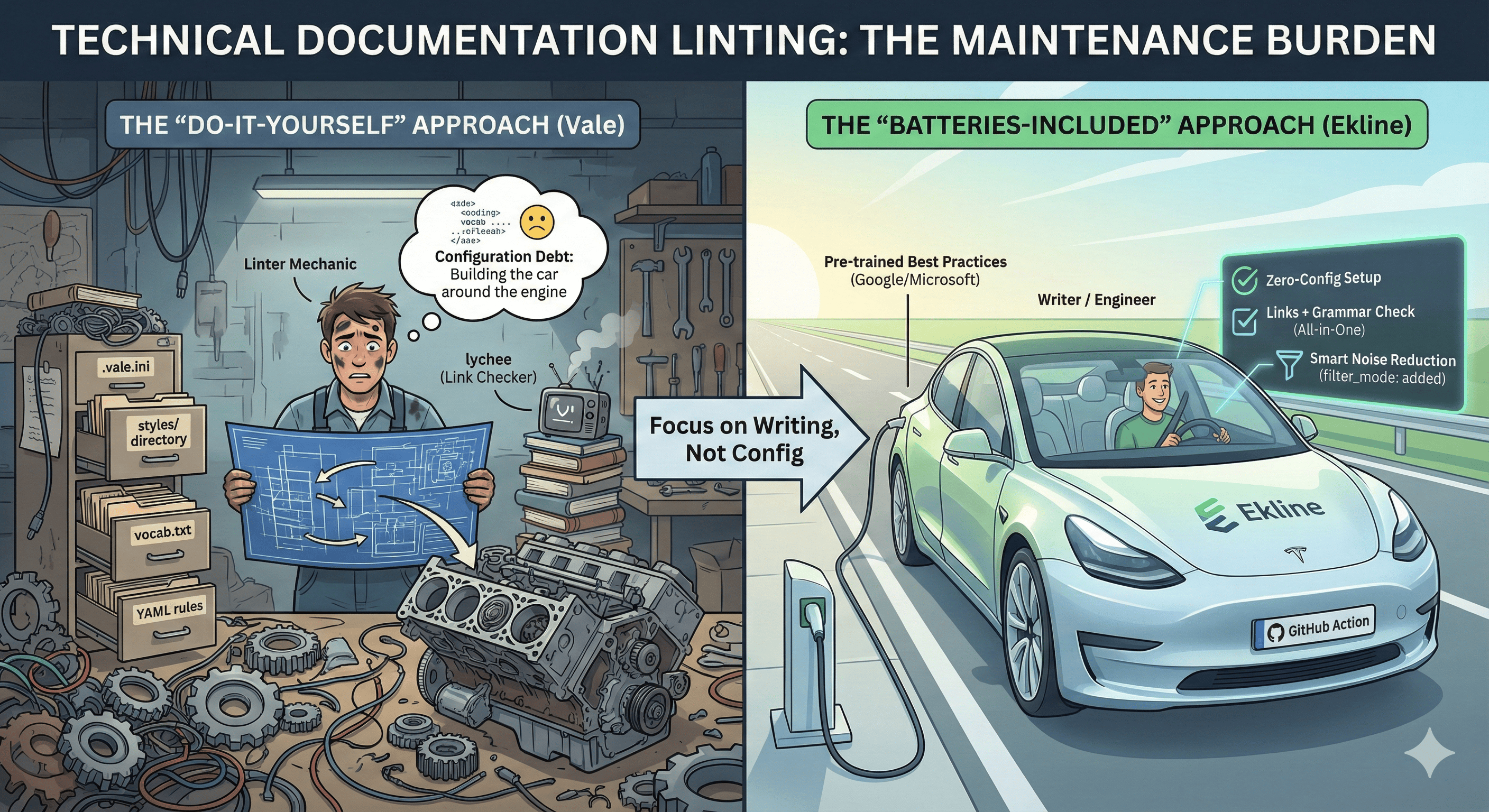
To get Vale running effectively in a CI/CD pipeline, you often end up managing a complex web of .vale.ini files, styles/ directories, and vocab.txt lists. You become a "Linter Mechanic" instead of a writer or engineer.
We built EkLine not to replace the need for quality checks, but to remove the maintenance tax associated with them.
Here is a look at the difference between the "Do-It-Yourself" approach (Vale) and the "Batteries-Included" approach (EkLine).
The Hidden Cost of Vale: "Configuration Debt"
Vale is an incredible engine. It uses Regular Expressions to catch style violations. But out of the box, it does very little. You have to build the car around the engine.
1. The Setup Friction
To set up a robust Vale environment, you typically need:
- A .
vale.iniconfiguration file. - A styles/ directory (which you must sync across repos).
- Specific rule implementations (YAML files) for every check.
- A separate tool (like lychee) to check for broken links, because Vale doesn't do that.
Typical Vale Config:
StylesPath = styles
MinAlertLevel = suggestion
Packages = Google, Microsoft

[*.md]
BasedOnStyles = Vale, Google
Google.Passive = NO
Microsoft.Contractions = YES
You have to decide every rule. You have to maintain every exception.
2. The "Noise" Problem in CI
When you add Vale to a GitHub Action, it lints the entire file.
If a developer fixes a typo in a 5,000-line legacy file, Vale might flag 50 preexisting style errors.
Result: The developer ignores the check, or you turn it off.
The EkLine Approach: "Batteries Included"
We designed EkLine to be the tool you drop into your workflow when you want results, not a configuration project. It is a Documentation Reviewer that works out of the box.
1. Zero-Config Setup
EkLine comes pre-trained with the best practices from the Google Developer Style Guide and Microsoft Manual of Style. You don't need to create a styles folder. You don't need to write Regex.
You simply add the action, and it starts reviewing.
YAML
# .github/workflows/ekline.yml
- uses: ekline-io/ekline-github-action@v1
  with:
    ek_token: ${{ secrets.EKLINE_KEY }}
    reporter: github-pr-review
    filter_mode: added
That’s it. No external config files required.
2. All-in-One Validation (Links + Grammar)
With Vale, you need a second tool to check for 404s (Broken Links).
EkLine includes Broken Link Validation natively.
It scans your docs for dead URLs and invalid email formats automatically during the review. One tool, one workflow.
3. Smart Noise Reduction (filter_mode)
This is the feature developers love most. EkLine allows you to scope the review strictly to the lines changed in the PR.
- filter_mode: added: EkLine only reviews the lines you added or modified.
- filter_mode: diff_context: EkLine reviews the changed lines and their immediate context.
This means you can add EkLine to a massive, messy legacy repo today, and it won't scream about old errors. It will only guard the new code.
Comparison: The Maintenance Burden
| Feature | Vale | Ekline |
|---|---|---|
| Setup | High Effort (Config + Styles) | Zero Config (SaaS) |
| Link Validation | ❌ Requires separate tool (e.g., lychee) | ✅ Native & Built-in |
| Noise Control | ❌ Lints entire file | ✅ Filter by added lines |
| Rule Updates | Manual (Update style files) | Automatic (Managed Cloud) |
| Review Type | Static Analysis (Regex) | AI-Assisted Review |
When to use which?
Stick with Vale if:
- You have a dedicated Technical Writer who loves tweaking Regex rules.
- You require a fully offline / local-only solution.
- You have highly specific, non-standard style requirements that you've already built custom rules for.
Switch to EkLine if:
- You are an Engineering Team: You want docs quality CI, but you don't want to maintain a "docs infra" team.
- You want to focus on Writing: You have Technical Writers who love writing rather than setting up rules.
- You hate noise: You only want feedback on the code you just wrote (filter_mode: added).
- You want Simplicity: You want Grammar, Style, Tone, and Broken Links checked in a single GitHub Action.
Summary
Vale is a great engine for those who want to build their own linter.
EkLine is a complete car for those who just want to drive.
If you are tired of maintaining .ini files and want a reviewer that just works, give EkLine a try.